Android simulator
compose-preview android-simulator runs a whole Android app — a debug APK, as
you’d install it on a device — in Robolectric’s simulator. You get a
desktop window you drive with the mouse and keyboard, or a JSON-lines control
channel an agent drives. No emulator, no device, no adb, no GPU. It boots in
seconds, runs headless in CI and cloud sandboxes, and its system UI answers
questions an emulator would make you click through by hand.
compose-preview android-simulator app-debug.apk                      # a window
compose-preview android-simulator app-debug.apk --control stdio      # an agent drives it
compose-preview android-simulator app-debug.apk --launcher           # over a home screen
compose-preview android-simulator phone.apk --pair watch.apk         # a phone and its watch
compose-preview android-simulator --adb                              # a device adb and Studio see
compose-preview launch is the command’s original name. It’s still there as
an alias that takes the same flags, so existing scripts and MCP hosts keep
working.
The simulator is a prototype that grows quickly. This page says what you can
test with it today and where the gaps are. The flag-by-flag and
command-by-command reference is
docs/SIMULATOR.md.
Requirements
- Java 21+ for the simulator JVM (
--java <jdk>orCOMPOSE_PREVIEW_SIMULATOR_JAVA). The CLI itself still runs on Java 17. - An Android SDK platform for its
android.jar:ANDROID_HOME, orsdk.dirinlocal.properties. - A debug APK. The first run converts the APK’s dex to JVM classes once and
caches it by content, so later runs start in seconds.
--prepareconverts and caches without starting the app.
Robolectric and its native graphics come from the same Android daemon sidecar that Android previews render with, at the same pinned version.
Driving it
By hand. Clicks are taps, drags are swipes, and right-click is Back. The
window can be resized and zoomed (⌘/Ctrl = / - / 0).
From an agent. --control stdio reads one JSON command per line on stdin
and writes one JSON object per line on stdout: tap (by text, resource id or
coordinates), swipe, type, key, screenshot, hierarchy, find,
starting activities and services, sending broadcasts, querying providers, and
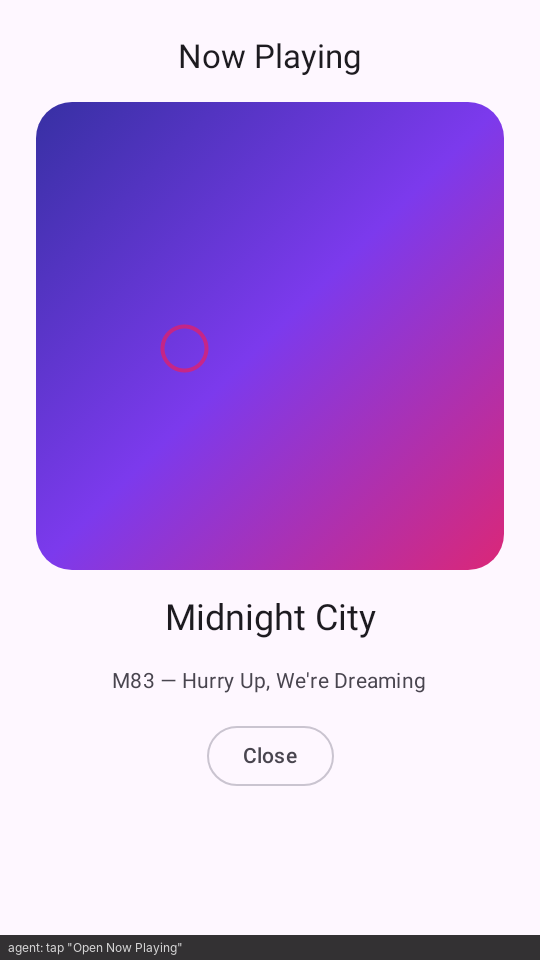
much more. The window stays up while the agent works: every tap is drawn as a
ring and every swipe as a trail, on an overlay that never shows up in the
agent’s own screenshots. Pass --headless to drop the window. It’s also the
default when there’s no display.
→ {"id":1,"cmd":"tap","text":"Open Now Playing"}
← {"event":"activity","state":"resumed","activity":"com.example.NowPlayingActivity",…}
← {"id":1,"ok":true,"result":{"x":183.5,"y":348,"node":{…}}}
→ {"id":2,"cmd":"screenshot","path":"/tmp/now-playing.png"}
← {"id":2,"ok":true,"result":{"width":540,"height":960,"path":"/tmp/now-playing.png"}}
From an MCP host. The local MCP server (compose-preview mcp serve, see
Agents & MCP) wraps the control channel as its own set of tools,
each titled “Android simulator: …” so they read apart from the preview tools:
| Tool | Does |
|---|---|
android_simulator_launch |
starts an APK (or a Gradle project, a watch face, a pair) and returns a simulator id |
android_simulator_command |
sends one control-channel command and returns its result and events |
android_simulator_screenshot |
the display as an image |
android_simulator_watchface_snapshot |
a watch face’s status and a frame |
android_simulator_logs |
the tail of the app’s logcat and Robolectric’s log |
android_simulator_restart / _update / _reload |
a fresh JVM, a rebuilt APK, or a hot-swapped edit |
android_simulator_adb |
adb against a simulator launched with adb |
android_simulator_stop |
ends one |
Earlier MCP releases called these simulator_*. Those names still work but
are no longer listed.
As a device. --adb makes the simulator a device that adb and Android
Studio see, the way they see an emulator (emulator-5554): adb install,
shell, push / pull, the emulator console, and the gRPC endpoint that
Studio’s Running Devices window streams over.
From a script. --scenario <file> replays a JSON or YAML list of control
commands headlessly. Each step can save a snapshot and assert on the result.
The run writes report.json and exits 2 if any step fails, so you can run it
as a CI check.
What you can test
Runtime permissions
Every way an app asks — ActivityResultContracts.RequestPermission /
RequestMultiplePermissions, requestPermissions, ActivityCompat,
Accompanist — is answered in place of the system dialog. The result reaches
the app the same way the dialog’s does. The permission controller’s own rules
apply as they do on a device:
- not in the manifest → denied;
- denied twice → “don’t ask again” until
grantorreset; - group grants (contacts, calendar, nearby devices, …);
POST_NOTIFICATIONSbelow Android 13 → ignored;- fine location without coarse → ignored;
- background location before foreground → ignored.
shouldShowRequestPermissionRationale follows the deny count.
With the ask policy, the request waits for your answer, so you can test each
branch of the app’s permission flow: grant, deny, dismiss,
approximate (coarse location only) and selected (Android 14’s partial
photo access).
→ {"cmd":"permissions","policy":"ask"}
← {"event":"permissions","state":"waiting","ask":["…ACCESS_FINE_LOCATION","…ACCESS_COARSE_LOCATION"],…}
→ {"cmd":"permissions","answer":"approximate"}
← {"event":"permissions","state":"answered","granted":["…ACCESS_COARSE_LOCATION"],"denied":["…ACCESS_FINE_LOCATION"],…}
Biometric and device-credential prompts, Credential Manager, voice input, the document and photo pickers, and the share sheet are answered the same way: each one raises an event and waits for a policy or an answer.
Notifications
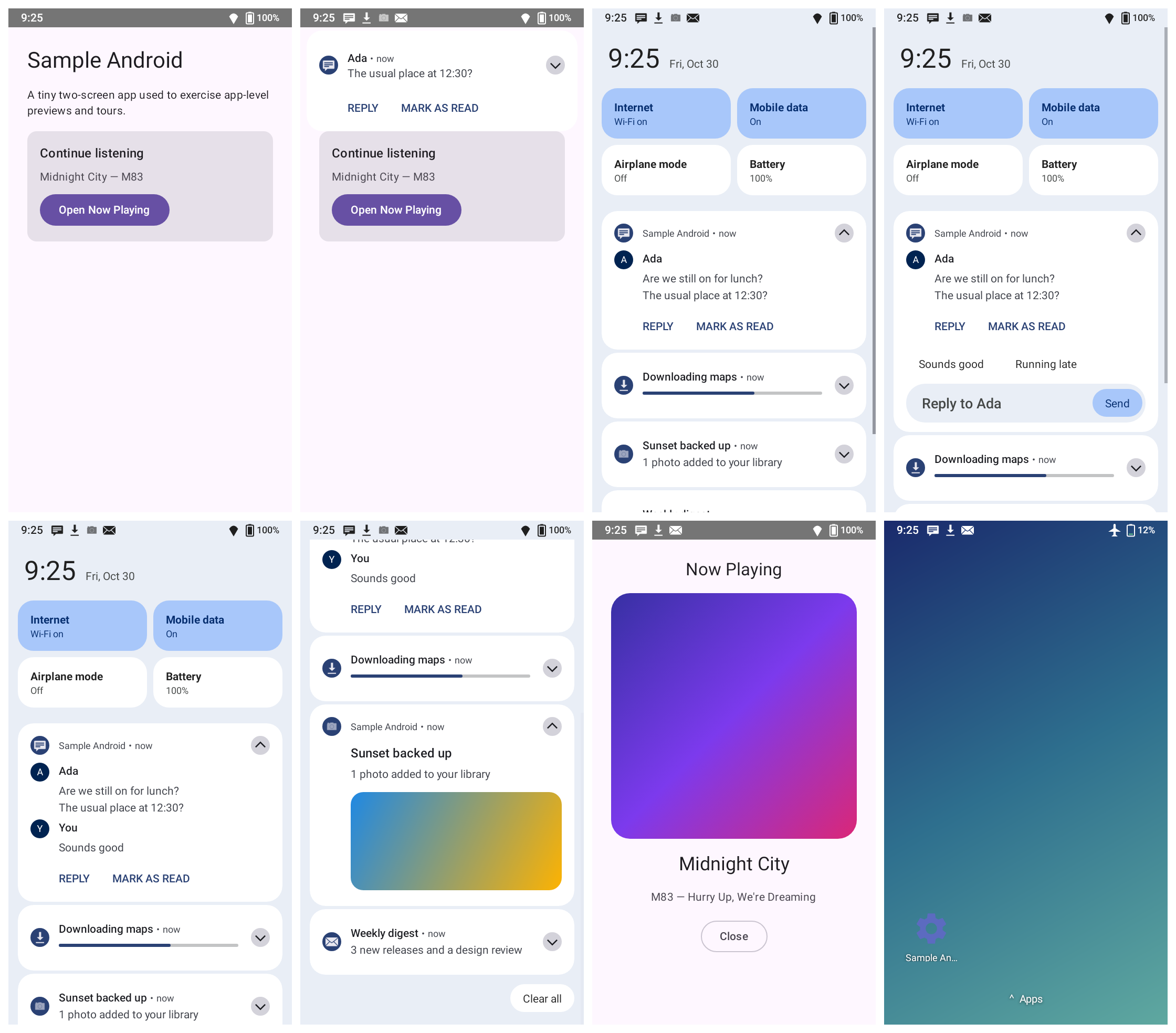
With --launcher, a phone gets a status bar, a notification shade and
heads-up cards. Each is a system window above the app, so screenshots show
it and it takes touches. Notifications are inflated from their own
RemoteViews, so MessagingStyle, BigPictureStyle, progress, actions and
custom views draw as they do on a device. In the shade you can:
- tap a notification to send its content intent (auto-cancel is honored);
- press its actions;
- type an inline reply that fills the
RemoteInput; - expand or collapse it;
- swipe to dismiss it, or Clear all.
A MediaStyle notification shows as the Android 13+ media player, and its
buttons send the player’s actions.
The notification stream is also on the control channel for every app, with or
without --launcher:
notificationevents report each post, update and removal;notificationslists them, and each entry says whether a device would hide it (blocked channel,POST_NOTIFICATIONSdenied);notificationacts on one by key:tap,action,reply,dismissorsnooze.
→ {"cmd":"permissions","grant":["android.permission.POST_NOTIFICATIONS"]}
→ {"cmd":"broadcast","intent":{"action":"com.example.POST_NOTIFICATIONS","component":".NotificationDemoReceiver"}}
← {"event":"headsUp","key":"1"}
→ {"cmd":"notification","key":"1","op":"reply","text":"Sounds good"}
Launcher widgets and shortcuts
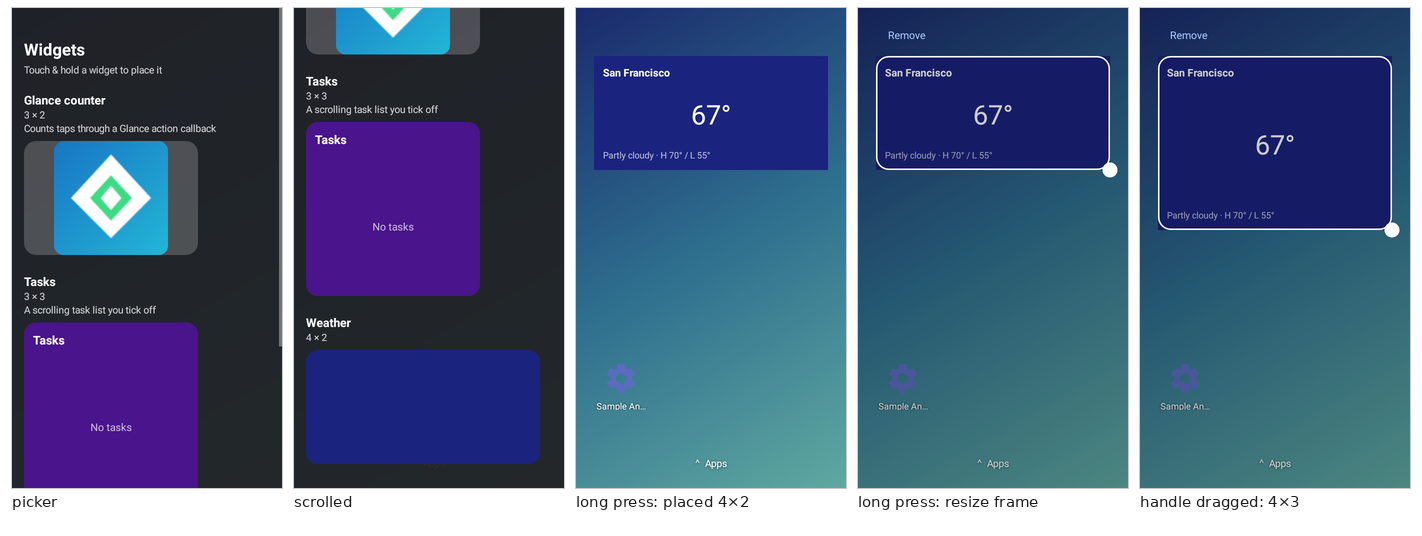
--launcher also puts a home screen under the app. HOME and Back from the
app’s root go there, its icons bring the app’s task back, and a long press
shows the app’s static and dynamic shortcuts. --widget <provider>
(repeatable) starts with one of the app’s app widgets already placed.
The home screen hosts widgets the way a launcher and AppWidgetService do
between them:
- Bind —
APPWIDGET_ENABLEDandAPPWIDGET_UPDATEreach the app’s receiver.GlanceAppWidgetReceivertakes the same path. - Configure — runs the configure activity.
RESULT_OKplaces the widget; anything else removes it. - Size — sends
APPWIDGET_OPTIONS_CHANGEDwithOPTION_APPWIDGET_SIZES, so responsiveRemoteViewspick their layout. - Draw — the framework’s own
AppWidgetHostViewdraws the widget. - Resize — resizing stays within
minResize*/maxResize*. - Pin —
requestPinAppWidgetandrequestPinShortcutshow a confirm sheet (pinaccept/reject).
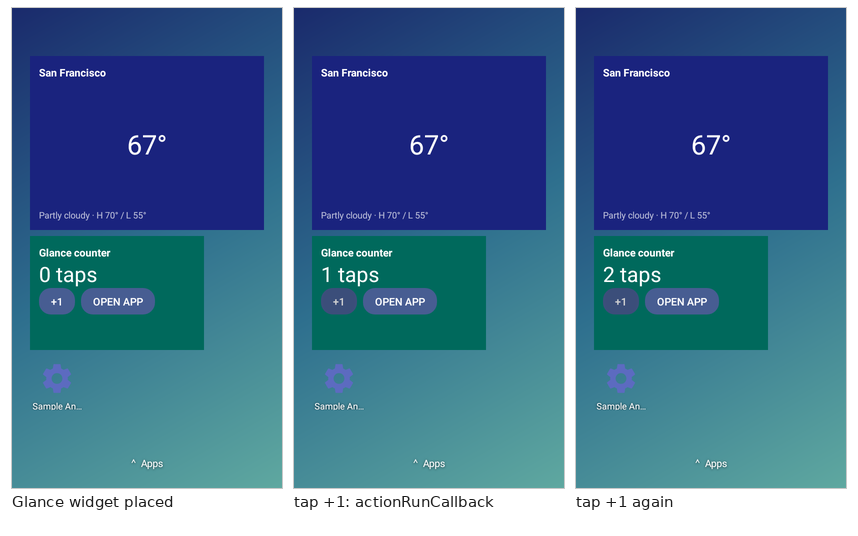
Taps on a widget send its setOnClickPendingIntent, checked-change response
or collection fill-in intent as the system does. That includes Glance’s
actionRunCallback, which recomposes in its WorkManager session and arrives as
an updated event. Collection widgets bind their RemoteViewsService, and the
picker shows each provider’s generated preview, preview layout or preview
image, the same fallback Launcher3 uses.
→ {"cmd":"widget","action":"add","provider":"TaskListWidgetReceiver"}
← {"event":"widget","state":"configuring","widgetId":1,…}
→ {"cmd":"tap","textContains":"Work task 2"}
← {"event":"widget","state":"updated","widgetId":1,"partial":true,"reason":"click",…}
→ {"cmd":"widget","action":"resize","widgetId":1,"spanX":4,"spanY":4}
And more
The reference covers each of these in detail:
- Display and device state. Device presets (phone, foldable, tablet,
desktop), fold postures, rotation, dark mode, font scale and locale.
Secondary displays (
--display) forPresentationand launch-display activities. - Network. Wi-Fi, cellular, offline, captive portal and airplane mode, each
as the app’s
ConnectivityManagerreports it. Bluetooth LE peripherals the agent puts in range. Google Play services availability states. - Background work. Alarms, jobs, WorkManager and downloads, all on the simulated clock.
- System UI. The navigation bar, the lock screen, picture-in-picture, the on-screen keyboard and predictive back.
- Several apps on one device.
--install other.apkadds apps that share broadcasts, providers, App Functions and App Actions. - Live reload.
--project <dir>builds the app.reloadhot-swaps a composable edit into the running app, and--livereloads on every save.restartandupdatereplace the app in a fresh JVM and keep its data. - Other form factors. Wear OS (see Wear OS), Jetpack Compose Glimmer glasses, and Android XR in Home Space.
Gaps
What runs: Compose and View apps over the framework Robolectric shadows, with
their real Application.onCreate(): Hilt, Koin, Metro, WorkManager, Room,
androidx.startup and Firebase start-up. Now in Android, Confetti, Home
Assistant, Cadence and MeshCore run from their debug APKs.
What doesn’t, or not yet:
| Area | Gap |
|---|---|
| Native code | Android .so files don’t load. The exceptions are libraries with a host build in host-natives: graphics-path, sqlite-bundled, Ink, zstd-jni, JNA, libsignal and Filament. |
| GPU | No TextureView, video, camera or GL. SurfaceView works, for software and hardware canvases. |
| Play services | Reported as installed, but only the Wearable Data Layer is simulated. Maps, billing, fused location and the rest report API_UNAVAILABLE. |
| Processes and tasks | One process and one task. No recents or task switching, and am kill / force-stop / pm clear are only partial. |
| Permissions | No dialog on screen: the agent answers in its place. Groups are approximated, and the activity isn’t paused while a request waits. |
| Notifications | No notification history, per-channel settings, conversation or bubble sections, Do Not Disturb, sounds or vibration. Quick settings are four fixed tiles, not the app’s own TileServices. |
| Home screen | Only the app’s own widgets and shortcuts: one package. No wallpaper picker, keyguard or search widgets, or dragging a widget between cells. Network-backed widgets show their placeholder where the sandbox blocks the host. |
| Lock screen | No pattern or password lock, no fingerprint unlock, and no lock screen widgets or shortcuts. |
| Background work | No Doze, App Standby buckets or battery optimisation. Downloads have no notification. |
| Packaging | Split APKs and App Bundles must be merged into one APK first. Protected APKs are out, and hot reload and the Data Layer need a debug (non-R8) build. |
| Fidelity | Robolectric’s native graphics, not a device GPU: close, but not pixel-identical. Stack traces say Unknown Source for app frames. |
| SDK levels | One of Robolectric’s supported levels (--sdk, default 35), fetched on first use. |
The full list, with the reasons, is under Constraints in the reference. Open gaps are tracked as issues.